
Aaron, how do we manage our projects in Asana!!!
I get it.
Project management can be confusing.
There are numerous apps all trying to claim to do everything under the sun, and it can be hard to tell whether this is true or not.
But what we specialise in at Lynn Industries is educating business owners about what apps they need and how they fit with their people and processes.
Asana in this case is the technology that will help make your people and processes work better.
Table of Contents
Open Table of Contents
What Type of Project Management Is Asana Best For?
Asana is designed for:
-
Workflow management. Asana helps your teams focus on what is important, on organising work in one place, and provides for almost-seamless collaboration.
-
Project and task management. Asana tells you what needs to be done, with a due date and someone assigned to it.
-
Goals tracking. Asana lets you put your business OKRs and strategic objectives in one place and track them down to a project and task level.
What Asana Is NOT For
Asana can’t do everything, nor does it claim to.
Which is actually one of the things we like about it.
Here’s what Asana cannot do.
It can’t replace email in the traditional “write a letter” sense, but it will replace many of your internal team discussions.
It can’t replace your calendar app or service.
It won’t replace your contact list.
It is an adjunct to Slack, not a replacement.
It won’t replace your cloud storage (Google Drive/Dropbox).
It won’t replace your knowledge base or wiki.
It can replace your meeting notes, but we recommend storing meeting notes in Notion.
Why Asana?
An excellent question is:
Why Asana?
Why not ClickUp, Monday.com, or any other of the numerous project management SaaS products on the market today?
Well, Asana is a great product.
It’s not perfect, but for project and task management, it does exactly what it says on the box, with minimal downsides.
As a business owner, you also need to consider that high visibility in advertising and media is not the same as having a good product.
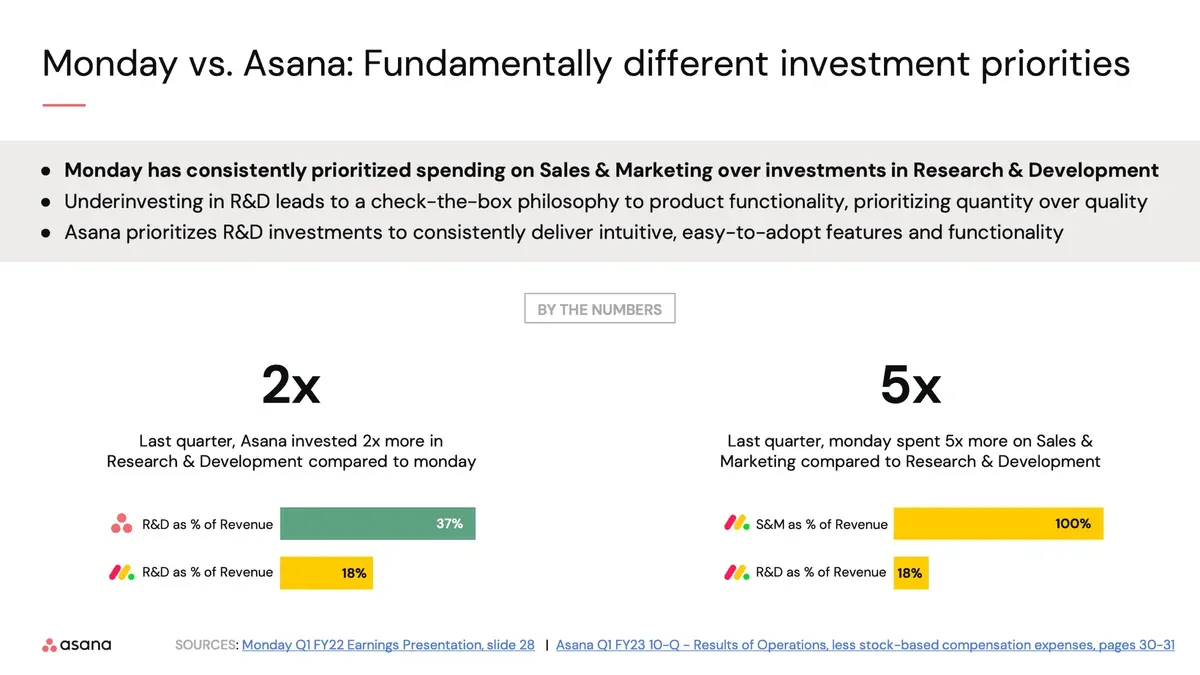
Asana spends 37% of its revenue on R&D.1
Compare that with competitors like Monday.com, who only 18% spend on R&D.
Asana is spending 2x more, and Asana is a larger company in terms of revenue.
Asana’s competitors spend up to 100% of their revenue on sales and marketing to push visibility.2 Asana spends relatively little in comparison.3
The question becomes:
Do you want the better researched and developed product, or the one that’s just better hyped?
Here’s why we personally like and use Asana at Lynn Industries.
It has a clean, modern, but not overly “shiny” interface. Compare this to:
-
Airtable, which is all tables.
-
ClickUp, which is far, far too shiny.
-
Monday.com, which reminds us of project trackers from the early 2000s in Excel.
Asana’s features are rolled out once fully developed and not in perpetual “beta”. Think iPhone, not Android. Features are slow to arrive, but once they do arrive, they work as advertised.
Asana also doesn’t try to be an all-in-one app, but focuses instead on the core of project and task management. And for that, it works, very, very well.
Asana is also a large, enterprise-level, publicly-traded company. This means that they are not in a scramble to secure funding or at risk of being acquired (and the product being discontinued) anytime soon.
Which Version of Asana Should We Use?
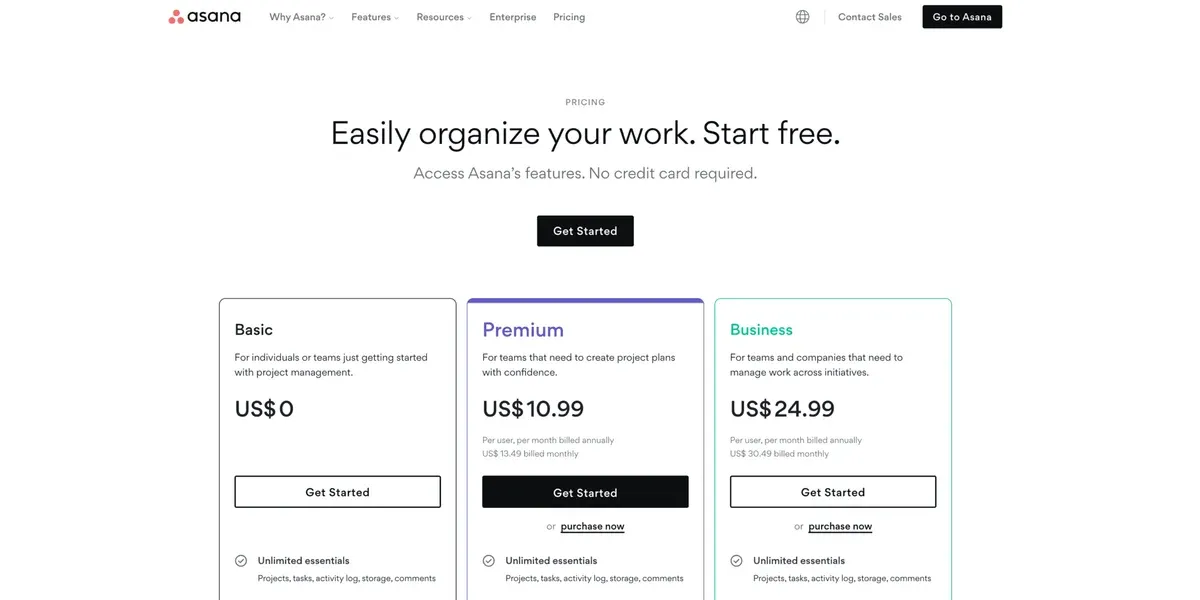
If you’re running a business, I’d skip the free version of Asana as it has no start dates or custom fields.
Most businesses will run perfectly fine on the Premium edition.
I’d only consider using the Business edition, if you want to use Goals, meaning you set OKRs every quarter and track them.
Or, if you would like to use the Portfolios and Workload Management functions, because you have a large team.4
People online like to complain that Asana is expensive, but… your business should be making much more than your licence cost by the time you are considering using Asana. There’s absolutely no reason to be using it, or any other project management tool, if your needs aren’t there yet.
The Asana Hierarchy and Terminology
As a small or medium-sized business owner, you are going to have to understand how Asana is structurally organised, as you will play a major part in championing and rolling it out to your team.
Here’s how it works:
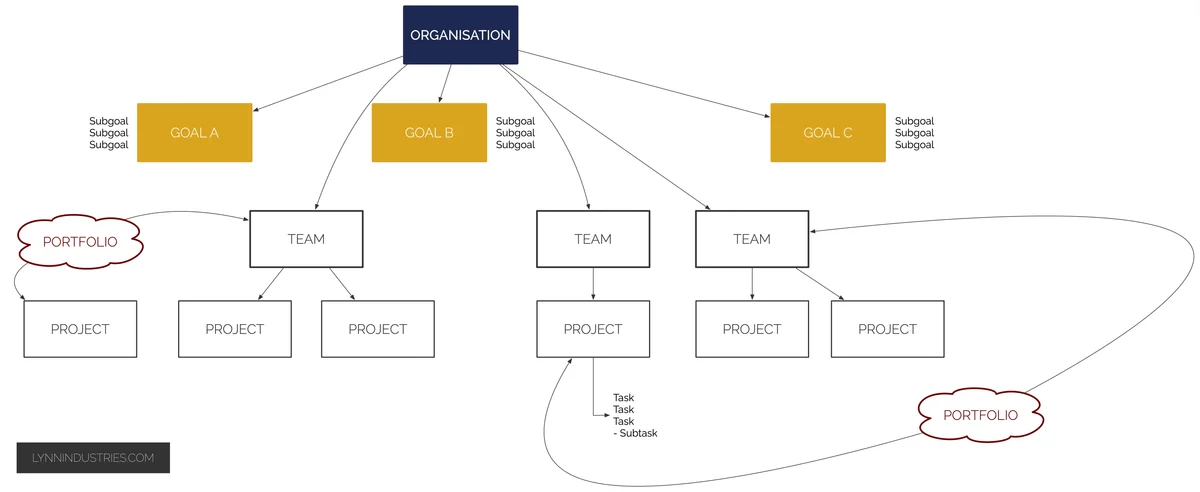
The top level in Asana is the organisation. This is the company or business, and represents your entire business.5
Then you have goals, which are your OKRs or strategic objectives. These are the big, high-level wants.
You can also use sub-goals to drill down into specific objectives and link them to projects and milestones.
You then have portfolios, which are groupings of projects and a way to track progress and workloads across different teams or sets of projects.
You then have teams, which are the main folder-level organisational unit.
This can be actual teams like marketing, accounts, delivery etc. Or they can be conceptual team groupings like client projects, internal business areas or personal projects.
Then come projects, which are the main base-level organisational unit. Projects are simply sets of tasks put together to get work done.
At the very bottom you have tasks and sub-tasks, which are “things to do”, with due dates, assignees, descriptions and a clear start and end to them.
How to Set Up Your Project Management in Asana
Here’s how we recommend business owners go about setting up their project management in Asana. It’s also the process we use if you do an Asana Intensive with us.
1. Start by asking:
What problem do I want Asana to solve for me?
This is working out your requirements and the hard questions of:
-
Why Asana?
-
Why not another app?
-
Who will lead the charge? Who are our Asana champions?
You should ask these questions before committing to any sort of project management application.
2. Next, decide on the types of projects that need to go into Asana.
Most service businesses will have:
-
Client-facing projects.
-
Business areas.
-
Internal (once-off) projects.
-
Personal projects.6
3. Group your projects and work out your teams.
A simple grouping for smaller businesses would be:
-
Client services.
-
Business areas.
-
Internal projects.
-
Personal projects.
If you want our recommendation for project groupings, grab our Asana Projects Cheatsheet below.
4. Do the setup.
This means setting up your:
-
Teams.
-
Projects, with colour coding.
-
Project templates.
-
Task templates.
-
Rules and automations.
-
Portfolios.
-
Business Goals.
-
Integrations with Slack and other apps.
For a head start on this, grab our Asana Projects Cheatsheet below.
Or if it seems all too complicated, book our done-for-you Asana Intensive service.
Training Your Team In Asana
Once you have Asana set up, you need to train your team in how to use it.
That includes using My Tasks, the Inbox, Favourites, the task pane and comments and subtasks.
This is exactly the kind of thing we teach business teams during Asana Intensives.
Asana Project Cheatsheet


Want a head start on setting up Asana for your business?
Grab our Asana Projects Cheatsheet to see how your organisation, teams, and projects should be set up in your Asana for maximum usability and success.
What To Do Next
If you’ve been thinking about using Asana in your business, you now have a good understanding of what it can do and a strong case for why you should pick Asana.
Get a head start by grabbing the Asana Projects Cheatsheet above.
Then set it up, and iterate your setup until it runs like clockwork.
Footnotes
-
Monday vs. Asana: Fundamentally different investment priorities. (n.d.). Slide show. ↩
-
It is possible to spend 100% of revenue on marketing and 18% on R&D, because companies can dig into their cash reserves or go into debt to spend more than their total revenue in a given year. ↩
-
Monday vs. Asana: Fundamentally different investment priorities. (n.d.). Slide show. ↩
-
Say 20+ team members. ↩
-
There is also an option to set up a division inside a larger corporate entity, but this likely will not apply to readers. ↩
-
Recommended over having orphaned tasks in My Tasks. ↩