
Every day we’re presented with new techniques, apps and ideas about how we can improve some part of our lives.
The question is: do we really need these shiny new things?
And if we do, how can we smoothly incorporate them into the existing systems in our life?
Our systems are a bit like jigsaw puzzles.
Sometimes things fit perfectly - and sometimes they don’t.
Most people make the mistake of scrapping their entire system (or app) when they come across something that doesn’t neatly fit.
This never works.
Changing your task management, email or other apps does nothing for your productivity, if you don’t already have the right principles in place.
A better way to go about it is to grab a pen, some paper and a pair of scissors - and work out what to trim and change so that the new app, technology, idea or technique improves your existing system.
Here’s exactly how you can do that.
Table of Contents
Open Table of Contents
A Model for Handling New Techniques, Ideas and Apps
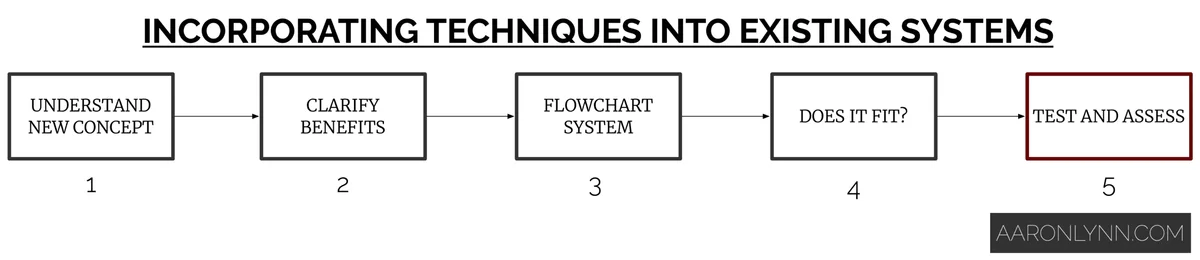
This is a simple model for incorporating a new app, idea or technique into your existing system and workflows.
Step one is to understand exactly how the new technique or app works.
This means writing it out, drawing it out and visualising yourself doing it or using it.
You must have a clear understanding of exactly what this new thing does to see how it can work with your existing systems.
Step two is to make sure that the benefits of the new thing are crystal clear to you.
Is this new app or technique really going to make you more efficient or your workflow smoother?
Do you really need it?
Is it worth the cost? And what about the time it takes to switch?
Are you incorporating it because it is actually beneficial, or because you’re just bored with your existing system?1
Step three is to flowchart your existing system.
Grab a pen and paper and draw it out.
Don’t worry about flowchart notation or anything fancy. Just know where your existing system starts, processes and ends, and what inputs and outputs there are.
Step four is to take the flowchart and the new idea and see where it fits, or doesn’t.
Does the new technique replace anything? Make anything better? Duplicate anything or make anything redundant?
Step five, should you decide to proceed, is to try the new technique and assess it after a trial period.
I would suggest a minimum two-week trial period for any new technique, app or idea.
After the trial period, you can assess and change the idea or system as needed.
You may decide to adopt the whole thing. Or you may decide to take the parts that work and discard the rest.
Examples of Incorporating New Techniques, Ideas and Apps Into Existing Systems
Here are some real-life examples of trying to incorporate new techniques, ideas and apps into existing systems.
Example 1: New email app
I often get questions about new apps and if they will help with someone’s workflow.
Let’s take the example of an email application. Say one that has fancy functions like automated sorting, snoozing emails and AI-driven prioritisation.
The first step is to understand what the new app actually is and does.
In this case, the app would essentially:
-
Hide certain emails from the inbox and present them at the “right time”.
-
Try to use an algorithm to sort and present incoming email in a different way.
Which equates to filtering what is seen and when it’s seen.
The second step is to determine if there are any benefits from using this app.
If you’re already practicing good email management, then you’ll recognise that most of the features are redundant and won’t actually be used.
And in this case we can stop at this step, because there are no clear benefits for adopting the new technology.
Result: New app not necessary.
Example 2: New social media/marketing platform
TikTok has seen explosive growth as a social media platform recently.
I was looking into it for myself and also for a couple of clients who are in more traditional industries.
The question is: does every business need a presence on every social network?
For the first step (understanding the new technology), I called a friend who has had a lot of success with TikTok and really tried to understand the concept. Which she summarised as:
-
Short less-than-one-minute videos.
-
Background music on videos.
-
Rapid editing.
-
Posting three-to-five times a day for maximum coverage.
-
Most popular accounts are celebrities or themed content.
-
Huge numbers of likes and comments, even compared to other platforms like YouTube or Instagram.
The second step was to work out the benefits.
For a business in a traditional industry:
-
Unless the business has a very visual product or service that is also entertaining, there’s no point.
-
It takes a lot to produce, edit and publish multiple short videos a day.
-
The demographics of TikTok skew towards teenagers, so unless the business primarily caters for them, other marketing channels will offer a higher ROI.
For myself:
-
I’m not particularly fond of video or video editing.
-
I’m much better at writing than I am on camera.
-
My readers tend to be established2 entrepreneurs and professionals.
In both cases there was no need to proceed beyond the benefit-analysis stage as there were no clear benefits.
Result: New social media platform not necessary. Lots of time saved for myself and my clients.
Example 3: New business software
I was introduced to Zapier by Matthew Guay a long time ago but never really paid much attention to it.
More recently though, I’ve received more questions about automation and using it to streamline workflows.
So I looked into it.
The first step I did was to try to understand Zapier. And after reading their website and playing around with the tool for a bit, I summarised it as:
-
Software that connects APIs for various SaaS and online services wrapped in a nice UI.
-
A server that runs automations and scripts based on set times or triggers.
The second step was to consider the potential benefits.
For this I did some Google research and came up with a list of things that could be automated. These were mostly things that I didn’t feel took that much time, but in reality would add up to quite a bit over the course of a month or year.
The third step was to flowchart my existing system and see where Zapier could fit in.
Because of the nature of Zapier there were many different flowcharts for many different things, but I’ll use a simple example here:

As you can see from the diagram, to process an email receipt before I had to:
-
Open Gmail.
-
Click on the email.
-
Print it to PDF.
-
Name the file, choose a folder and save it to Dropbox.
-
Wait for it to sync.
-
Record it in a spreadsheet for my accountant.
The fourth step was to see how Zapier could help improve or streamline this process.
In this case, I set up a Zap (as they’re known) that:
-
Checked for an email receipt.
-
Created a PDF.
-
Formatted the date/time and named the PDF correctly.
-
Saved it to Dropbox automatically.
-
Recorded the details in a spreadsheet.
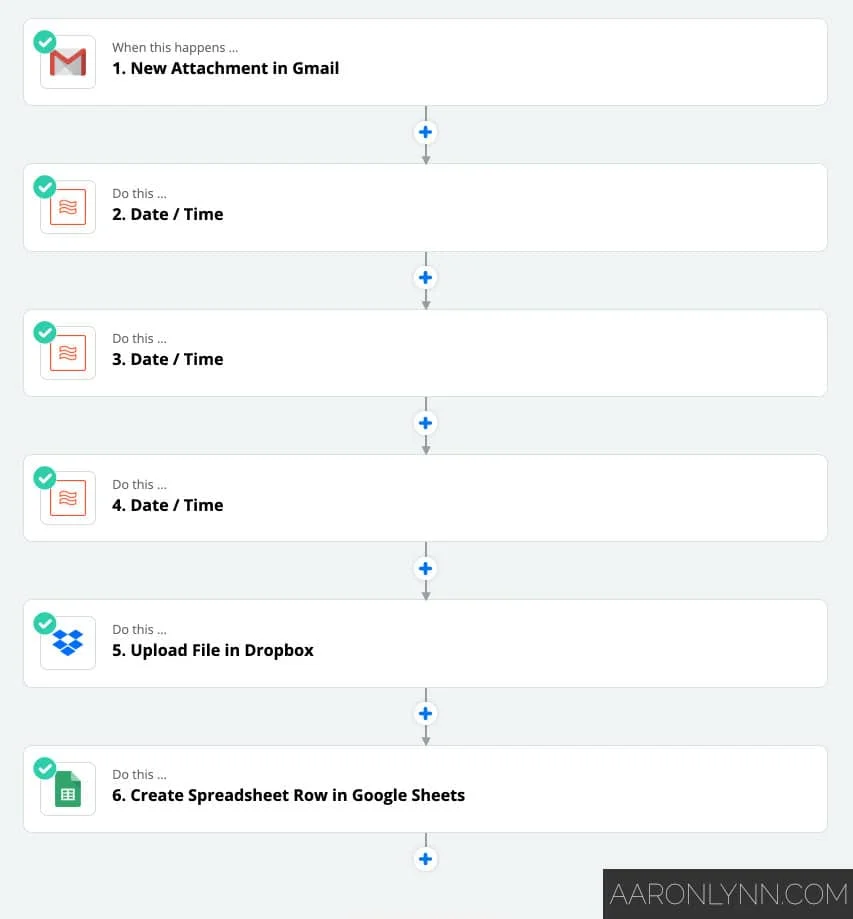
And the best thing - I never have to see or touch these emails, ever. It all happens automatically in the background.
The last step was to test and trial the new technique.
As of writing, I’ve been using Zapier substantially for a few months now and it’s been nothing short of amazing. All the background processes that took five-to-ten minutes here and there are now all automated, and I’ve saved hours every month.
Result: Integrated into some workflows, replaced other workflows completely.
Example 4: New time management technique
One of the interesting ideas I came across when I was researching my article on timeslices was an idea called Flowtime.
Before writing about it, I wanted to test it out and see how useful it actually was.
The first step was to understand the new concept.
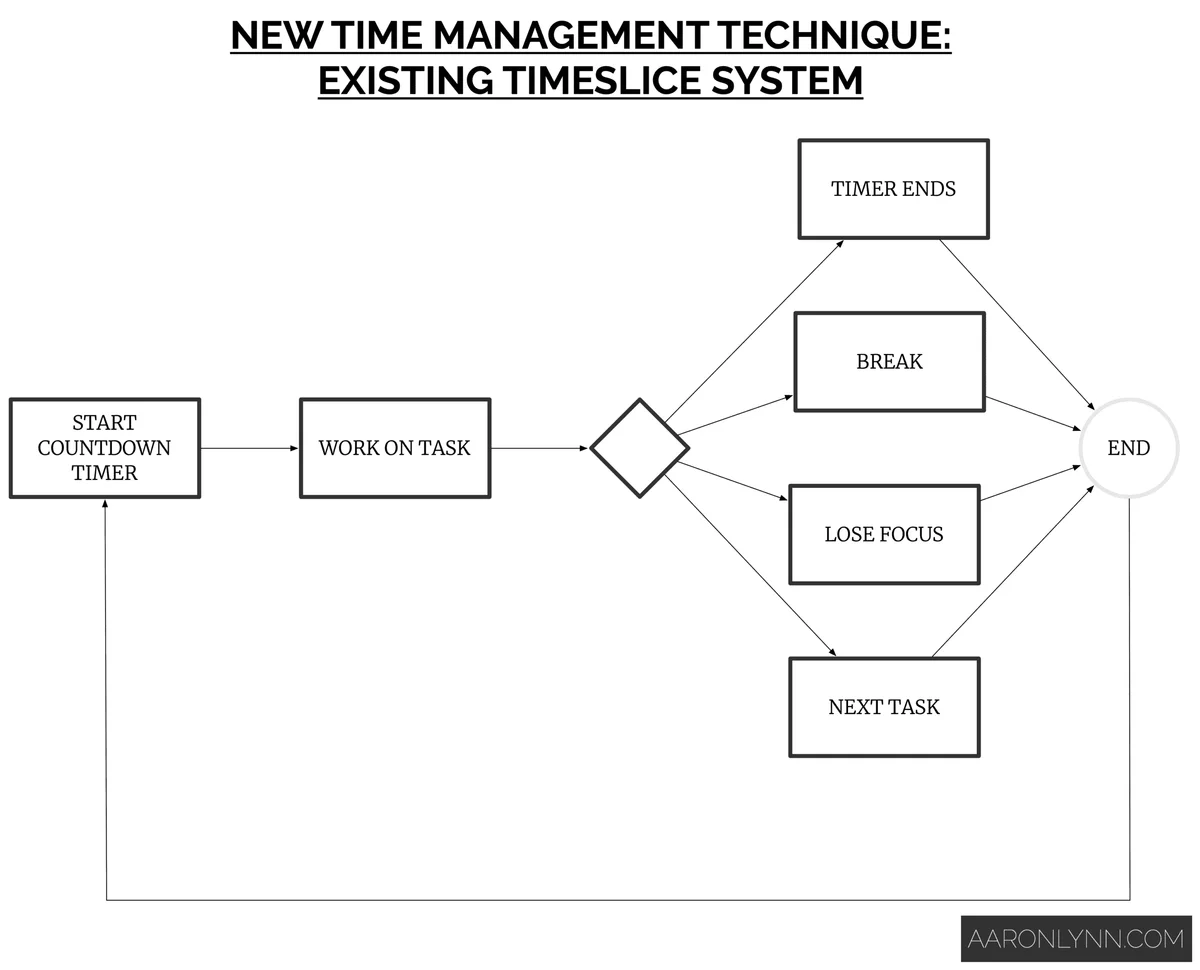
For traditional timeslices, you:
-
Start a countdown timer.
-
Take a predetermined break when the timer ends.
For flowtime instead, you:
-
Start a stopwatch (count-up) timer.
-
Take a predetermined break when you feel your focus waning.
The second step was to consider the potential benefits of switching. For me, these included:
-
Flexibility in how long I could work on a task or set of tasks. One of the things I don’t like about timeslices is that when the timer ends, you have to stop.
-
Ability to do multiple tasks in succession rather than the timeslice mindset of “one task per timeslice”.
-
Not having to break flow just because a timer ends.
-
Being able to push for longer deep work sessions while still maintaining the ability to take breaks.3
The third step was to flowchart my existing timeslice system, which looks like this:
The fourth step was to see if flowtime could supplement timeslices, or replace them entirely.
I created a flowchart for a flowtime system, which came out like this:
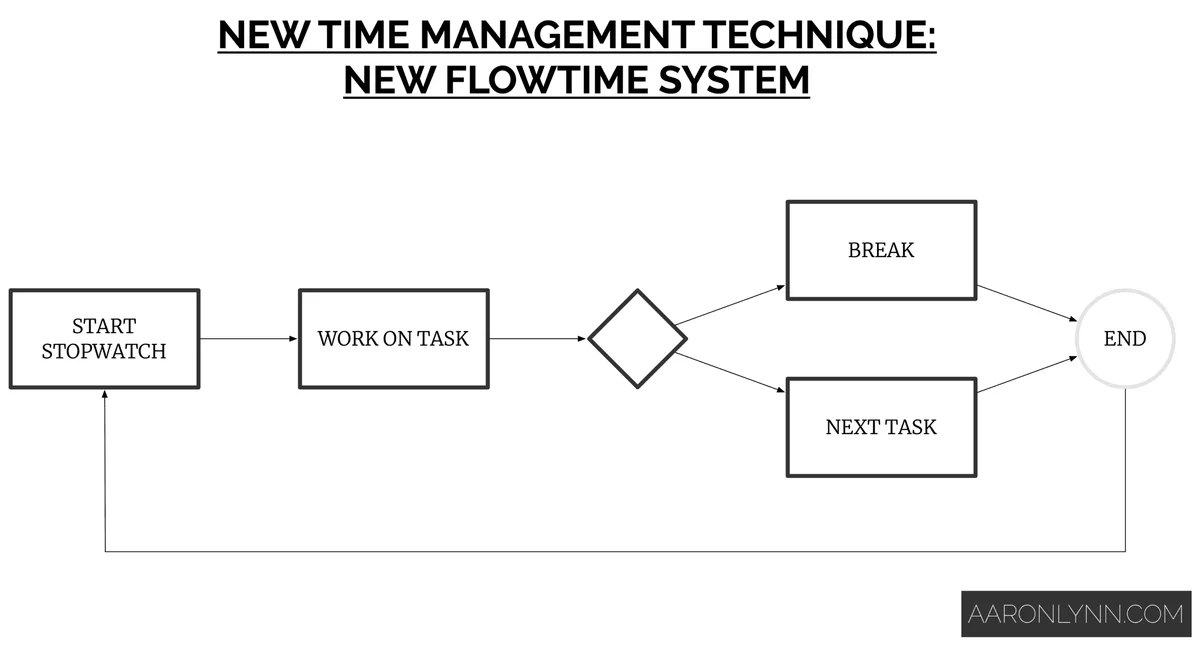
Based on the flowchart I created, it would be easier if flowtime replaced traditional timeslices completely.
The last step was to trial and assess the new technique.
After a few months of using flowtime, I decided that I liked it and just kept on using it.
Instead of using Focus for timeslices, I found a menubar program called Thyme that acts as a simple stopwatch for flowtime.
Result: Complete replacement of existing system.
What To Do Next
You now have a simple model for taking any shiny new technique, app or idea that you come across, and working out if it improves your existing systems and workflows.
Photo by Ken Suarez.